
Define Areas

NIMS allows you to setup an advanced delivery area based on plantation areas. Just like the Nursery structure the dispatch area structure allows for setting up a 4 tiered delivery structure. However sometimes you require additional information such as plantation sizes. In this example we use the 4th level to describe how this can be done.

| Field | Description |
| Customer | Select a customer that you have setup under the registers |
| Order | This field can be used for setting the order on reports |
| Section1 | Set the name of your level 1 tier for each customer |
| Section 2 | Set the name of your level 2 tier per customer |
| Section 3 | Set the name of your level 3 tier per customer |
| Section 4 | Set the name of your level 4 tier per customer |
In the example above we really only have two tiers – the plantation and the compartment. The first two levels are used to give us a plantation name and identification number and the third and 4 levels are used for compartments for each plantation and the hectares of each compartment.
Capture Areas

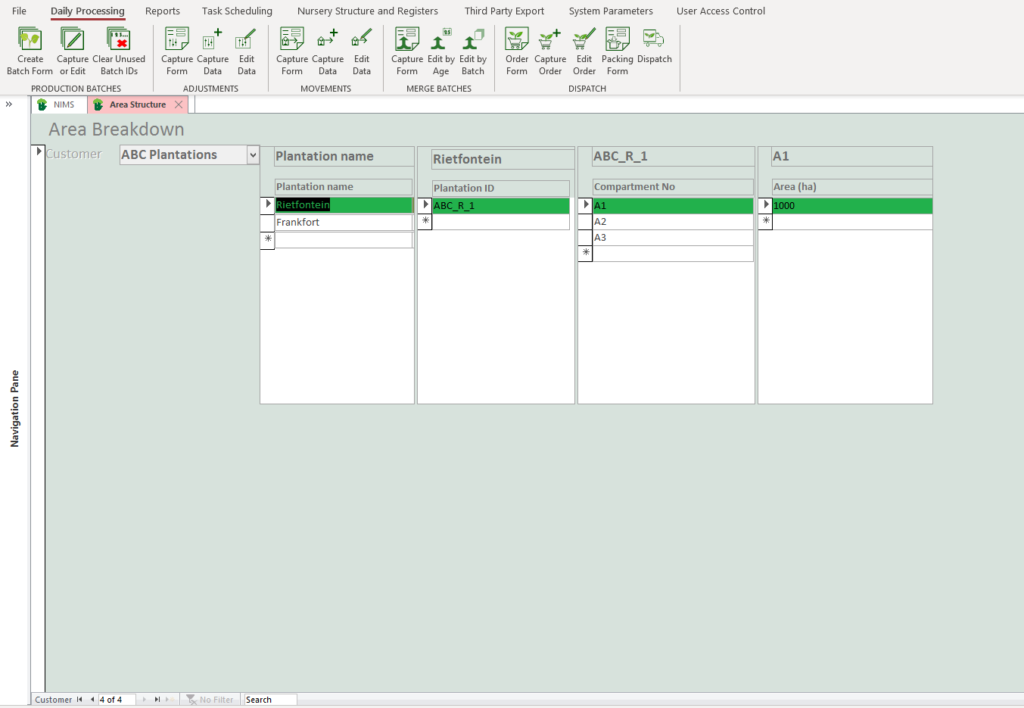
| Field | Example | Description |
| Customer | You select the appropriate customer by scrolling through available customers using the customer navigation bar at the bottom of the screen.  | |
| Section 1 | Plantation Name | Enter the actual name specific to the customers level 1 tier |
| Section 2 | Plantation ID | In this example there will be only one level 2 tier for each level 1 tier |
| Section 3 | Compartment | Enter the name for each of the level 3 tiers. In this case you will have numerous level 3 tiers for each level 2 tier |
| Section 4 | Hectares | Enter the “name” for each level 4 tier . In this case again their will only be one level 4 tier per level 3 tier as it is simply the size of each compartment. |