
This is where we add and maintain all the registers pertaining to Propagation materials, both Mother Plants and Clones as well as your Seed Register
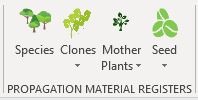
NIMS allows us to propagate seedlings either from cuttings from Mother Plants or by planting seeds.
Mother Plants and clones are related but SeedLots are stand alone.
Species
Species relate to both Clones and Seed Lots. You need to ensure that your species are captured before adding either Seedlots or clones to the species
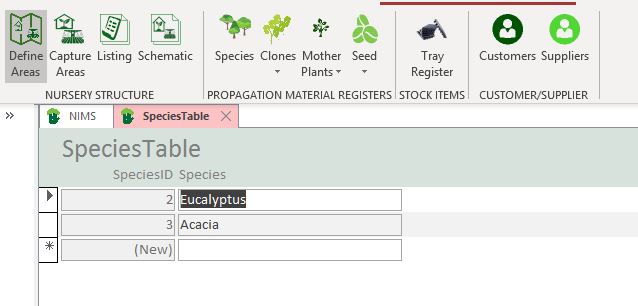
To edit a species simply edit the description under the sepcies column. To add a new species simply type the new species name in the Species column next to the (New)
Clones
Your clones which you use in your Mother Plant area and from which you propagate your cuttings, are contained in the clone register.
Add or Edit Clones
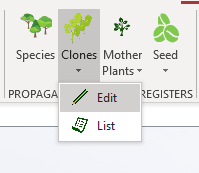
Select Edit from the drop down menu to either add a new clone or edit and existing clone.

Use the drop down box to select a clone to edit or click on  button to add a new clone
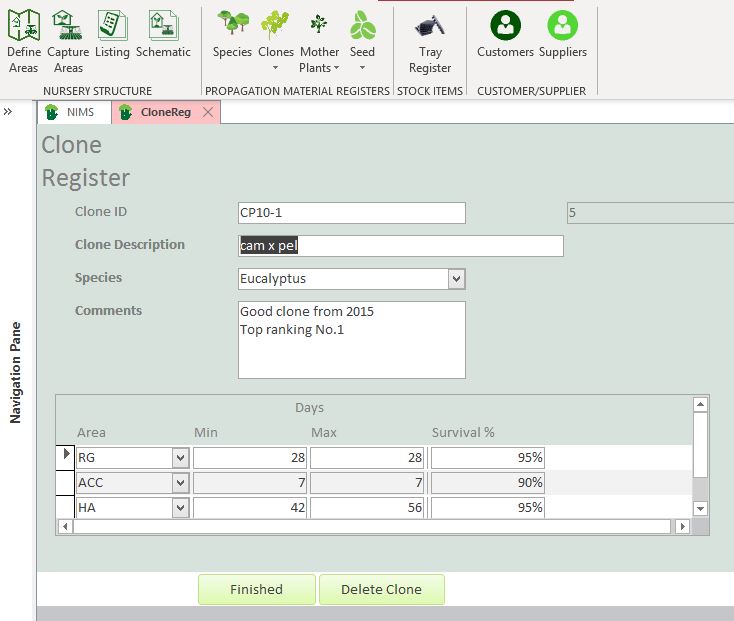
| Field | Description | Use |
| Clone ID | Enter your clone ID here | This ID must be unique and can contain alphanumeric characters. We do not recommend using unusual special characters like @,!,. etc. Rather use spaces, underscores and hyphens |
| Clone Description | Enter a short description identifying your clone | |
| Species | Select Species | This species list is managed under the species menu option in the group |
| Comments | You can enter any comments on the clone here |
The form also allows you to enter estimated days to be spent by a cutting in the different areas as well as expected survival rates per area.
| Field | Description | Use |
| Area | Select Area | Select the areas which your batch will move through in its lifespan. |
| Min | Minimum days | Enter the minimum expected days that the batch would remain in the area |
| Max | Maximum Days | Enter the maximum expected days that a batch would remain in the area |
| Survival % | Survival Percentage | Enter the survival percentage expected in each area. If you will only be doing your sorting in one area it is acceptable to enter a 100% survival rate for those areas in which there will be only movement. |
When you are happy with your data then you can click on the  button to take you back to the menu.
Should you wish to delete the clone you can click on the  button. Please note that you cannot delete clones that have been used by Mother Plants.
Clone Register List
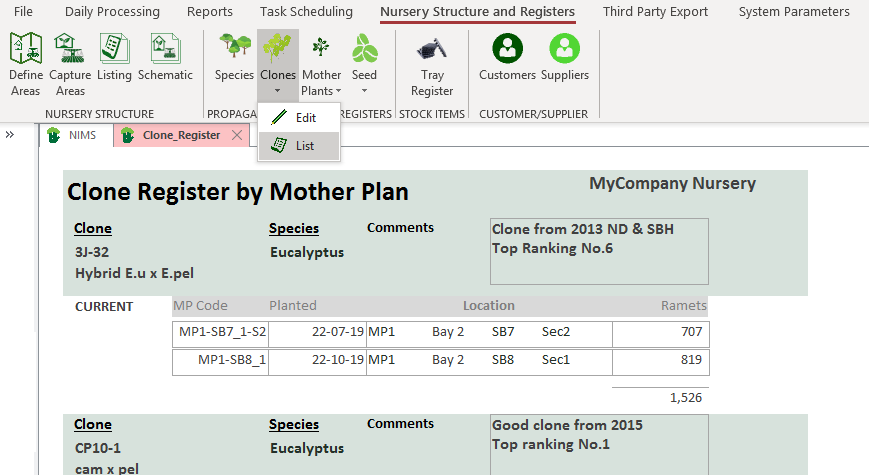
The register can be listed to screen or printed by selecting List from the drop down menu.
Mother Plants
To add or edit a Mother Plant item, you would select Edit from the drop down menu.
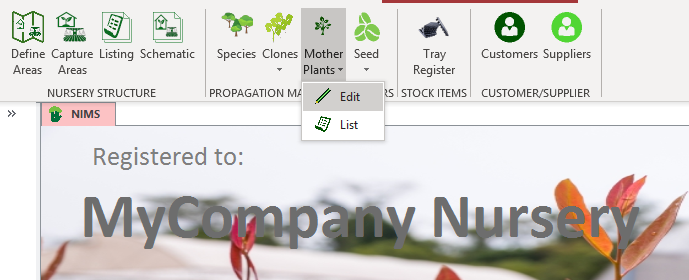
This will take you to a form where you can select to add new Mother Plant or to edit an existing Mother Plant.
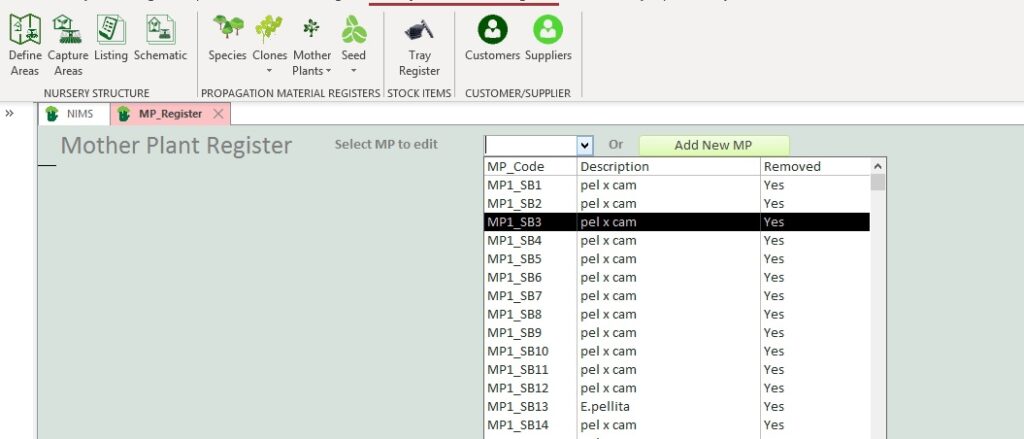
Either select a Mother Plant to edit from the drop down box or click on the  button to add a new Mother Plant
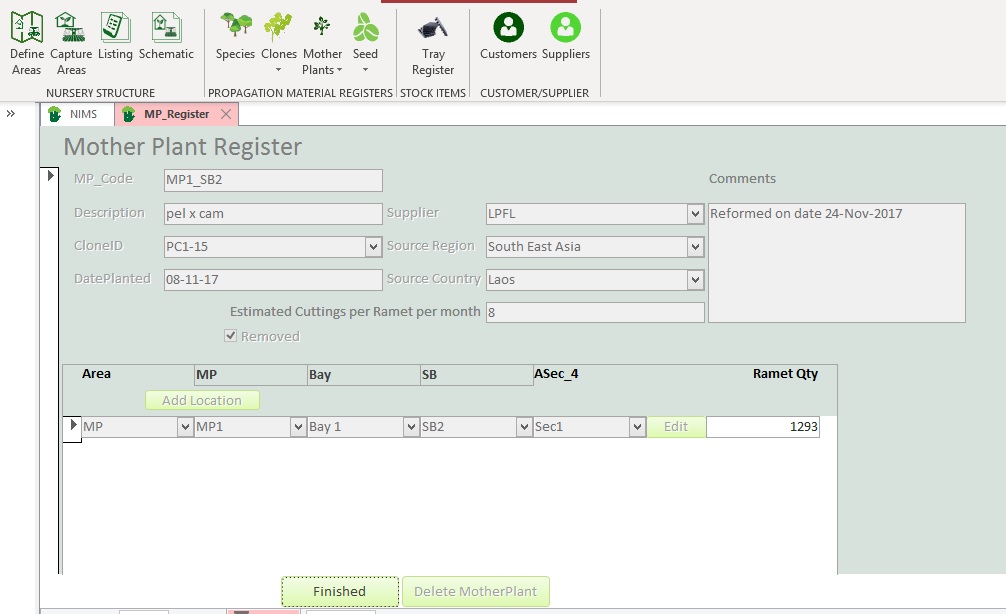
| Field | Description | Instructions |
| MP_Code | A code Identifying your Mother Plant | Enter a unique identifier for this specific Mother Plant. Although Mother Plants can be spread over a number of locations in you Mother Plant Area, we have found that linking the code to the Mother Plant location in the area was very practical for the workers. In the example the code reflects a Mother plant planted in Mother Plant Greenhouse 1 in sand bed 12. You could add other identifying characteristics such as year, section, season etc But do remember it is a code and should be kept as short as possible |
| Description | A short description | |
| Clone_ID | This is the Clone ID | You can have a number of Mother Plants from the same Clone. The Clone ID is fetched from the Clone Register. |
| Date Planted | Enter the date that you planted this Mother Plant | |
| Supplier | Supplier Code | This code comes from your supplier register under the Customer Supplier group in this tab. |
| Source_Region | Region Code | This code comes from your region register in system parameters |
| Source Country | Country Code | This code comes from your region register in system parameters |
| Estimated cuttings per ramet per month | Enter you expected cuttings per month from this Mother Plant | This is used in the production reports to compare your actual cuttings to what you expected to be able to cut in a month. |
| Comments | Enter any comments you have about this Mother plant here | |
| Removed | Click if this Mother Plant has been removed from its location | If a Mother Plant is removed form the Nursery then click this check box. NIMS maintains historic information. If you have used this Mother Plant in production you cannot delete it from the system. Production batches will be linked to this and it would cause corruption of your historic data. You should also not overwrite the Mother Plant with new information as NIMS will then link historic batches to this new information which would be incorrect. Rather add a new Mother Plant to the same location. |
| Add Location Button | Click this button to add a Mother Plant location | This will open the next screen which allows you to add a Mother Plant location. These locations should be created in the Nursery Structure menu group. |
| Edit | Edit the location | Click Edit to edit the location of the Mother Plant |
| Finished | Click when ready to save the data | |
| Delete Mother Plant | Click to delete the Mother Plant | If you have used this Mother Plant in Propagation you will not be able to delete it. You will have to first delete all data and batches associated with the Mother Plant. It is better to simply click on the remove checkbox in order to deactivate it. |
Mother Plant Location – Select
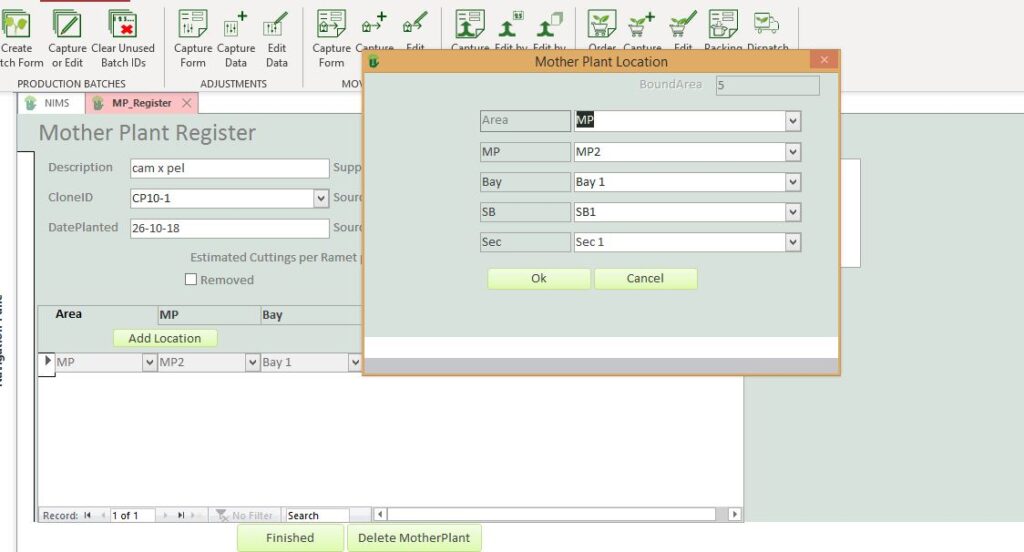
| Field | Example | Description |
| Area | MP | This will default to the Mother Plant area that you have identified in the system parameters setup |
| Level 1 | MP | Select the level 1 location |
| Level 2 | Bay | Select the Level 2 location if applicable |
| Level 3 | Sand Bed | Select the level 3 location if applicable |
| Level 4 | Sec | Select the level 4 location if applicable |
Mother Plant Register Listing
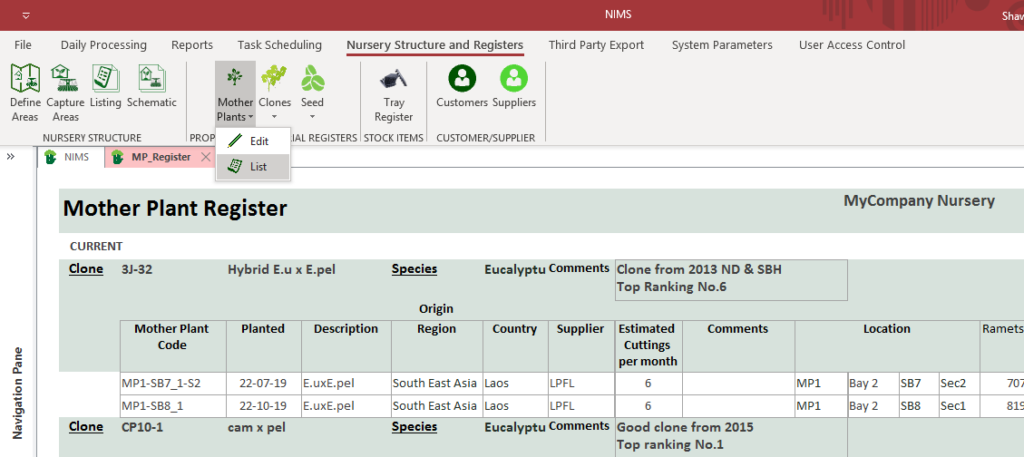
The Mother Plant Register can be listed to print or screen by selecting List from the drop down menu.
Seed Lots
If you use seed to propagate your seedlings, your different SeedLots would be entered here
Add or Edit Seed Lots
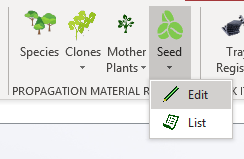
Select Edit from the drop down menu to either add a new Seed Lot or edit and existing Seed Lot.

Either select an existing Seed Lot for the Drop Down box to edit or click on the  button to add a new Seed Lot.
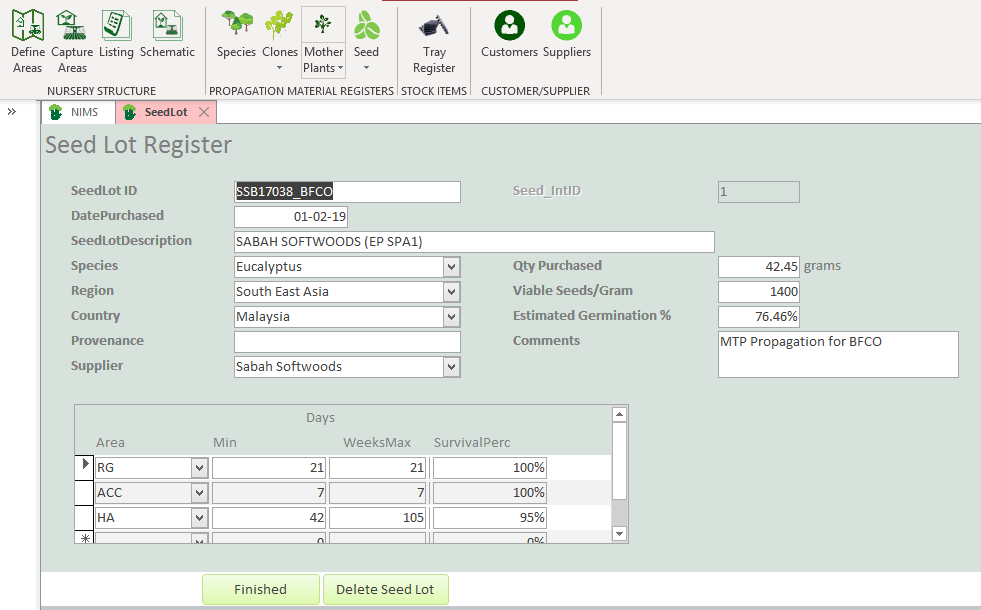
| Field | Description | Use |
| SeedLot ID | Unique Seed Lot identifier | This ID must be unique and can contain alphanumeric characters. We do not recommend using unusual special characters like @,!,. etc. Rather us e spaces, underscores and hyphens |
| Date Purchased | Date | Enter the date the Seed Lot was purchased |
| Seed Lot Description | Description | Enter a short description identifying your clone |
| Species | Select Species | This species list is managed under the species menu option in the group |
| Region | Region Code | This code comes from your region register in system parameters |
| Country | Country Code | This code comes from your region register in system parameters |
| Provenance | Origin | Enter place of origin |
| Supplier | Supplier Code | Enter the supplier code of the supplier as listed in your supplier register |
| Qty Purchased | Enter Qty in grams | This is the quantity of the SeedLot purchased in grams |
| Viable Seeds per gram | Enter a value | This is the expected amount of viable seeds per gram planted that could germinate |
| Estimated Germination % | Enter a value | This is your estimation of the percentage of the previous value that will actually germinate |
| Comments | This is a field where you can record comments on an ongoing basis on this Seed Lot. |
The form also allows you to enter estimated days to be spent by a seedling in the different areas of the Nursery as well as expected survival rates per area.
| Field | Description | Use |
| Area | Select Area | Select the areas which your batch will move through in its lifespan. |
| Min | Minimum days | Enter the minimum expected days that the batch would remain in the area |
| Max | Maximum Days | Enter the maximum expected days that a batch would remain in the area |
| Survival % | Survival Percentage | Enter the survival percentage of the seedlings expected in each area. If you will only be doing your sorting in one area it is acceptable to enter a 100% survival rate for those areas in which there will be only movement. |
When you are happy with your data then you can click on the button to take you back to the menu.
Should you wish to delete the SeedLot you can click on the button. Please note that you cannot delete SeedLots that have been used by Propagation Batches.
Seed Lot Register Listing
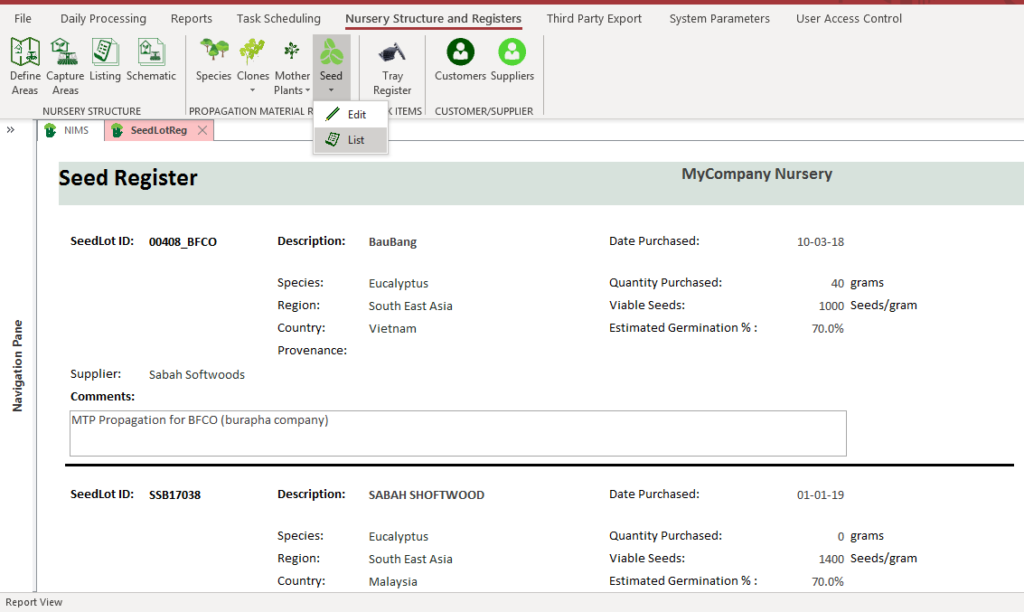
The register can be listed to screen or printed by selecting List form the drop down menu.