

The Setup process for scheduling requires two steps.
The first step is to create your activity or task list for the Nursery.
This is not the same as your adjustments which record the actual change in quantities. Rather your tasks or activities result in adjustments.
An example would be that you may have three sorting activities through the life cycle of the plant. These three sorts may result in different adjustment or even similar adjustments.
Your first sort may be straight out of the greenhouse. This will result in a loss of plants due to a sort removing your non-rooted plants. You would adjust the quantities using the rooting adjustment.
Later you would have a sort which may result in a quantity and a redistribution adjustment. In this case a single activity would result in recording two different types of adjustments.
And soon…
Activity List
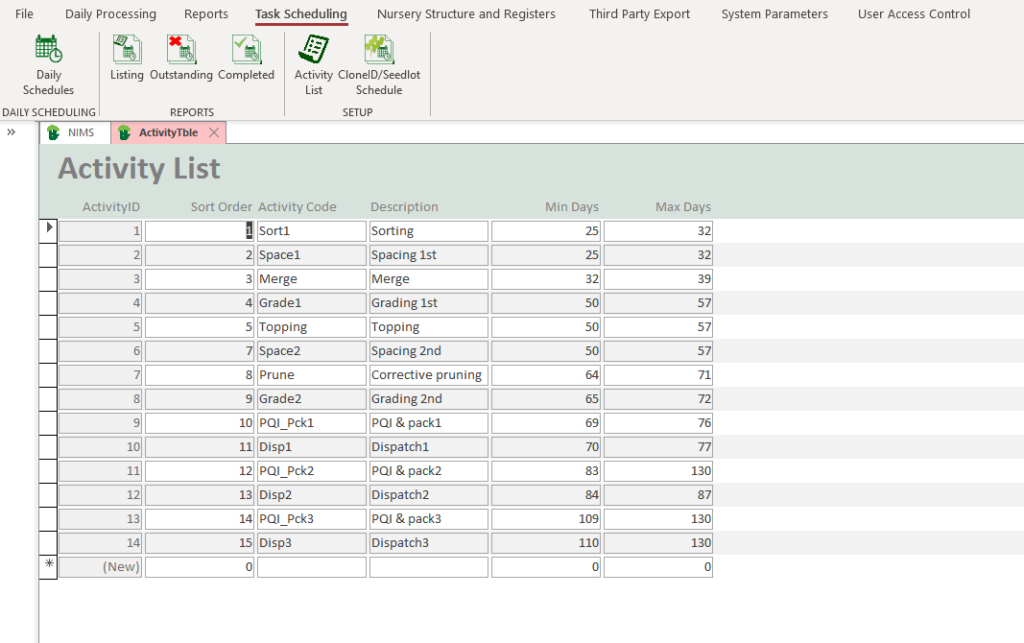
| Field | Description | Use |
| Sort Order | The chronological order of the activities | Here you would enter the order in which the activities should occur. NIMS will help you reorder the items should you wish to slot in a new activity. |
| Activity Code | Short Activity code | This is an alphanumeric code for the activity |
| Description | Activity Description | A short description of the actiivity |
| Min Days | Enter a start period | Activities are scheduled x amount of days from the plant date. NIMS allows for a range as it is impossible to plan ahead and get to every batch on a specific day. This field is the first day after plant date that an activity should occur |
| Max Days | Enter an end period | This field is an estimate of when the last day is when this activity should occur |
Note that this form uses the simplified navigation bar to allow you to add, delete and edit activities.
Your next step is to setup a schedule of activities for each clone or seed lot.
Clone or Seed Lot Schedule
In order to make it easy to assign a schedule to a batch and to save you having to create a schedule for every single batch, NIMS allows you to setup generic schedules by Clone or Seed Lot.
As you may plant the same Clone under different conditions, you may create a number of schedules per clone or seed lot.
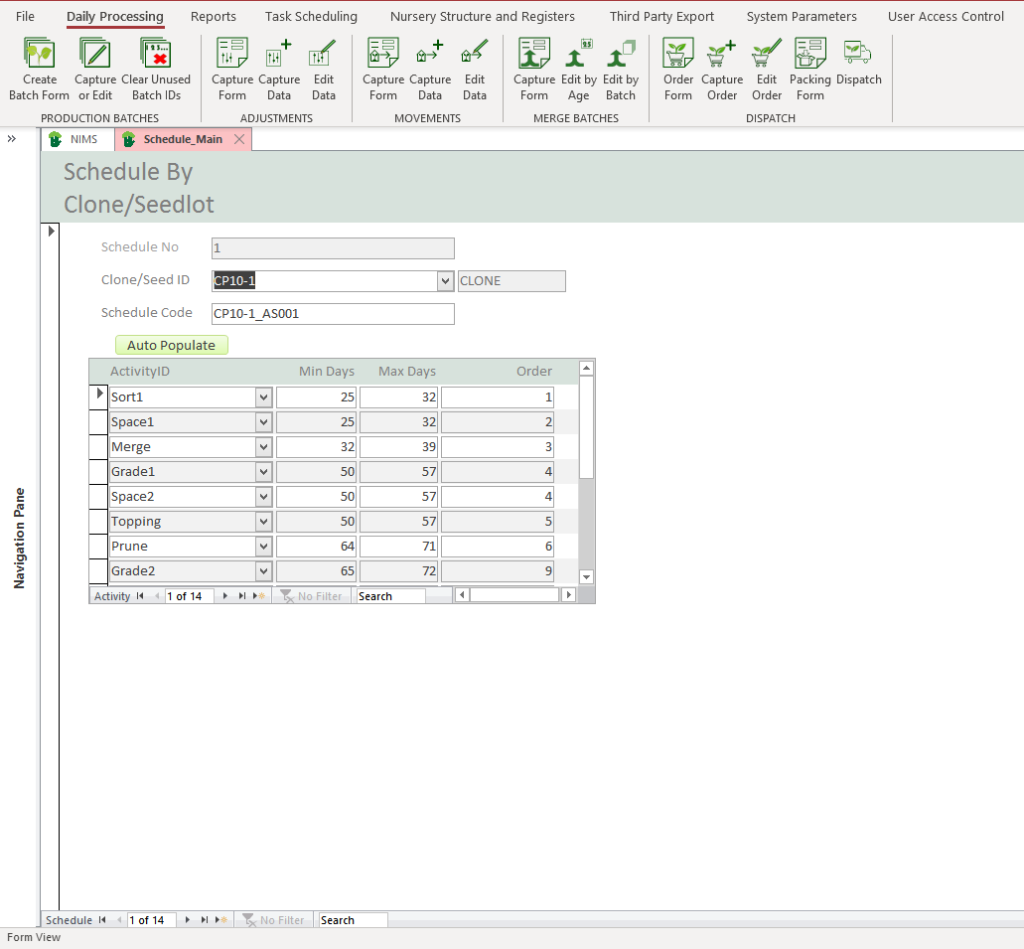
| Field | Description | Use |
| Clone ID/Seed Lot | Select a clone or seed lot for the drop down | This will be the Clone or seed lot that you are designing your schedule for. |
| Schedule Code | Create a short code for this schedule | Bare in mind when creating teh code, that if you have more than one schedule for a clone you do need to use this code to identify them. |
 | Click to auto-populate the list | To quickly create a schedule from your activity list click here. This will automatically add all your activities to this scedule. |
| Activity ID | Select an activity | You can select an activity from the activity list |
| Min Days | Start Period | Activities are scheduled x amount of days from the plant date. NIMS allows for a range as it is impossible to plan ahead and get to every batch on a specific day. This field is the first day after plant date that an activity should occur |
| Max Days | End Period | This field is an estimate of when the last day is when this activity should occur |
| Sort Order | The chronological order of the activities | Here you would enter the order in which the activities should occur. NIMS will help you reorder the items should you wish to slot in a new activity. |
Note that this form uses the navigation bar to allow you to add, delete and edit activities and schedules.